Take control of your ProDVX devices

From setup to daily operations

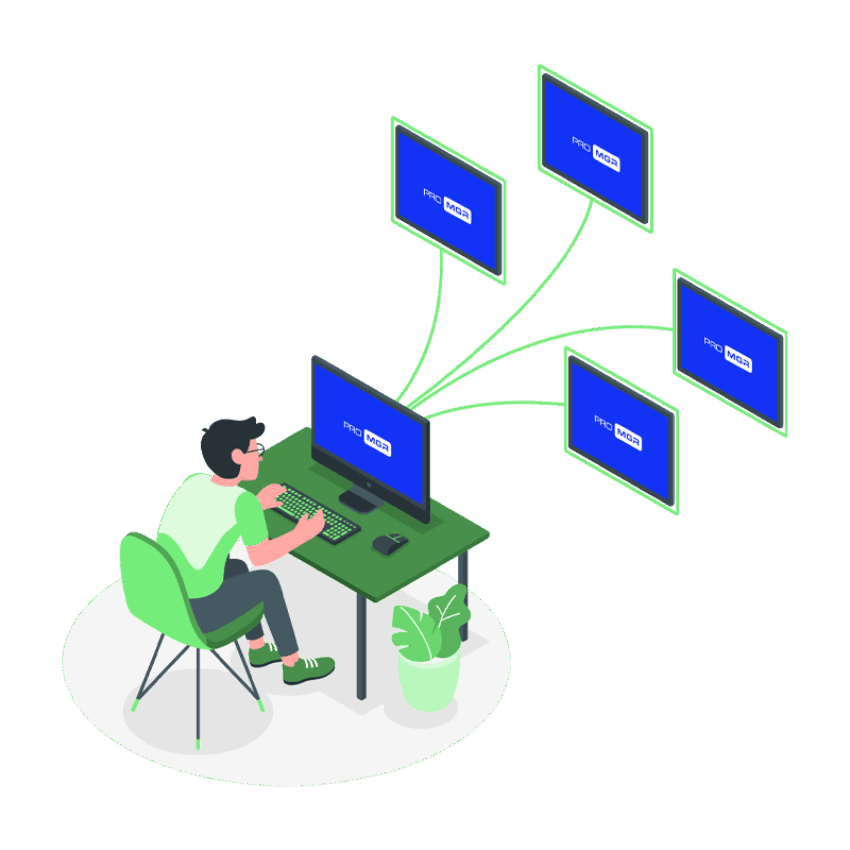
ProMGR is ProDVX’s device management tool, designed to help you deploy, secure and manage your ProDVX Android devices throughout their lifecycle. From initial setup to daily operation, it helps reduce manual work, minimize downtime and lower operational costs.


Get started with ProMGR

View technical features

Pro MGR lifecycle 1080

See how ProMGR supports every stage

Discover how ProMGR supports device deployment, security and ongoing management, and how ProMGR Remote Service extends that support remotely.

Simplify device management

As your device fleet grows, managing every device individually quickly becomes time-consuming. ProMGR helps you bring control to device management, making it easier to scale your deployment and simplify day-to-day operations.

With ProMGR, you can:

  • Save time across your deployment
  • Reduce operational effort
  • Scale with greater control

View technical features

Final

Explore ProMGR's key functionalities

See how ProMGR supports deployment, device security and ongoing management.

ProMGR Device Management Visual

Easy deployment

Prepare devices and content for use.

Examples

  • Centralized storage and management
  • Deploy configurations, apps and content
  • Local device configuration

Device security

Keep device usage controlled and consistent.

Examples

  • Set kiosk mode (Browser, Single app, or Launcher)
  • Set device security policies

Ongoing management

Support daily operations after rollout.

Examples

  • User management
  • Device management
  • Device monitoring and heartbeat

Reduce service visits with ProMGR Remote Service

Save time, reduce costs, and manage devices from anywhere

When updates, changes or troubleshooting are needed, on-site support can quickly become time-consuming and costly. With ProMGR Remote Service, you gain access to the tools you need to manage your ProDVX devices remotely, from adjusting settings and performing updates to troubleshooting and support.

  • Save time

    Manage devices remotely without travelling to site.

  • Reduce costs

    Lower travel expenses and reduce costly on-site engineer visits.

  • Respond faster

    Take action quickly when issues arise, without waiting for a site visit.

Ready to get started with ProMGR?

1. Request your ProMGR account

Request access through your account manager or complete our online registration form.

2. Activate & log in

Once your request has been processed, you will receive two separate emails:

  • Activation email: click the activation link within 24 hours to activate your account. If you cannot find the email, please check your spam folder.
  • Login credentials: this email contains the details you need to access the ProMGR portal.

After activating your account, use the login credentials from the second email to access the portal.

3. Set up your device

Follow the setup instructions on the device to complete the activation. To use ProMGR Remote Service, contact your account manager and include the device IDs that require remote access. Remote Service can then be activated for the correct devices.

A 30-day ProMGR Remote Service trial is available upon request. Please submit this request separately through your account manager.

Frequently asked questions

ProMGR is ProDVX’s device management tool for Android-based ProDVX devices. It helps you deploy, configure, secure and manage your devices more efficiently throughout their lifecycle.

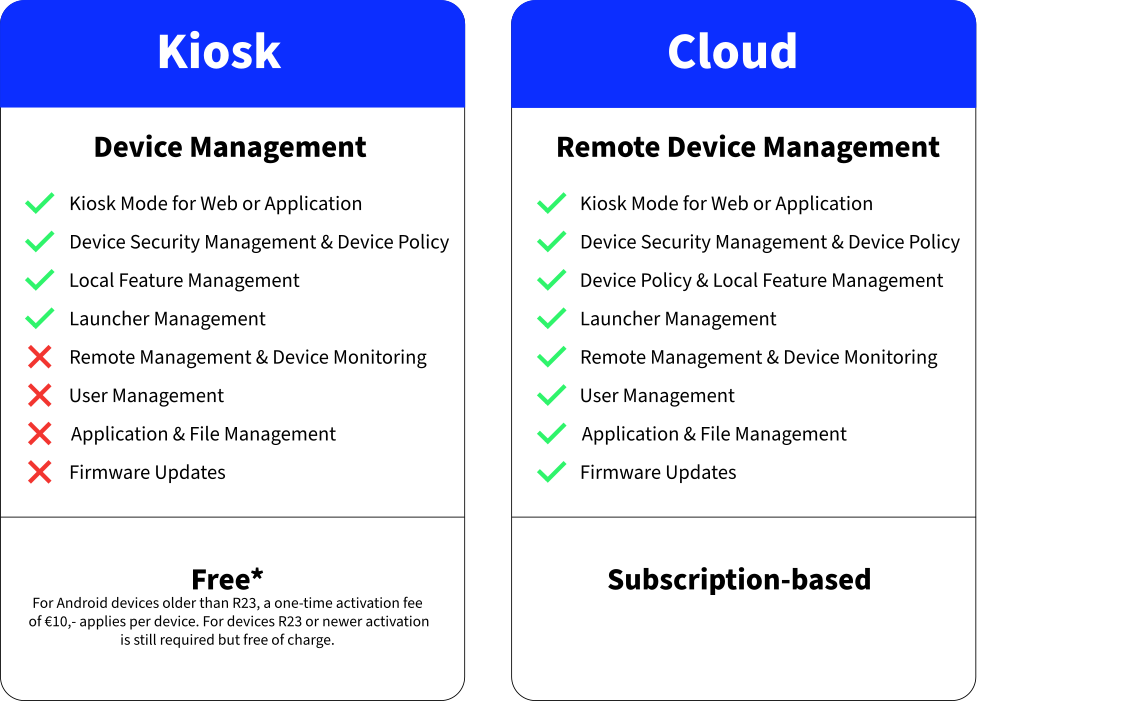
ProMGR includes local device management capabilities and access to the ProMGR portal. ProMGR Remote Service can be added for advanced remote management.

With ProMGR, you can configure devices, apply kiosk settings, manage users, organise devices into groups and prepare apps, files, profiles and configurations centrally.

ProMGR supports deployment, security and ongoing device management from one central environment. View the technical features page for a complete overview.

ProMGR Remote Service is an optional subscription that extends your ProMGR capabilities remotely. It allows you to manage, support and troubleshoot ProDVX devices from anywhere, reducing the need for on-site visits.

ProMGR Remote Service provides the tools you need to deliver remote service to your customers. It is not a managed service from ProDVX: we provide the remote management capabilities, while you remain in control of how you manage and support your deployed devices.

With ProMGR Remote Service, you can manage, maintain and support devices remotely, from deploying updates and monitoring device status to troubleshooting, running commands and managing files.

View all technical features.

Yes. You can use ProMGR to configure, secure and prepare your ProDVX Android devices without a Remote Service subscription.

A subscription is only required when you want to monitor, update or support devices remotely.

To get started with ProMGR, first request a ProMGR account through your account manager or via the online registration form in Step 1 above. Once your request has been processed, you will receive an activation email and a separate email with your login credentials.

After activating your account, you can log in to ProMGR, set up your device, and start using the available device management features.

If you also want to use ProMGR Remote Service, contact your account manager and provide the device IDs that require remote access. A Remote Service subscription can then be activated for the selected devices.